


Viewing FSMO Domain Controller Roles using NTDSUTIL
NTDSUTIL is included with
Windows 2000 Server, and one of its many uses is that it can
be used to view the Flexible Single Master Operation roles on a specified Domain
Controller.
You can start NTDSUTIL from either the RUN box in the start
menu or from the command prompt; both will start the command
line utility the same way.
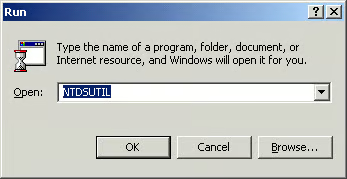
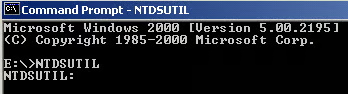
The following commands can
be used once the utility has started:
E:WINNTSystem32NTDSUTIL.exe:
? – Print this help
information
Authoritative restore – Authoritatively restore the DIT
database
Domain management – Prepare for new domain creation
Files – Manage NTDS database files
Help – Print this help information
IPDeny List – Manage LDAP IP Deny List
LDAP policies – Manage LDAP protocol policies
Metadata cleanup – Clean up objects of decommissioned
servers
Popups %s – (en/dis)able popups with “on” or “off”
Quit – Quit the utility
Roles – Manage NTDS role owner tokens
Security account management – Manage Security Account
Database – Duplicate SID Cleanup
Semantic database analysis – Semantic Checker
For the purposes of
finding the Flexible Single Master Operation roles on a
specified Domain Controller, we would opt to use the ROLES
command, which will put NTDSUTIL in FSMO MAINTENANCE MODE.
E:WINNTSystem32NTDSUTIL.exe: rolesfsmo maintenance: help
? - Print this help informationConnections - Connect to a specific domain controllerHelp - Print this help informationQuit - Return to the prior menuSeize domain naming master - Overwrite domain role onconnected serverSeize infrastructure master - Overwrite infrastructure roleon connected serverSeize PDC - Overwrite PDC role on connected serverSeize RID master - Overwrite RID role on connected serverSeize schema master - Overwrite schema role on connectedserverSelect operation target - Select sites, servers, domains,roles and Naming ContextsTransfer domain naming master - Make connected server thedomain naming masterTransfer infrastructure master - Make connected server theinfrastructure masterTransfer PDC - Make connected server the PDCTransfer RID master - Make connected server the RID masterTransfer schema master - Make connected server the schemamaster
Once in FSMO MAINTENANCE MODE, we would enter “Select
operation target” to put NTDSUTIL into that command mode.
fsmo maintenance: Selectoperation targetselect operation target: help
? - Print this help informationConnections - Connect to a specific domain controllerHelp - Print this help informationList current selections - List the currentsite/domain/server/Naming ContextList domains - Lists all domains which have Cross-RefsList domains in site - Lists domains in the selected siteList Naming Contexts - Lists known Naming ContextsList roles for connected server - Lists roles connectedserver knows aboutList servers for domain in site - Lists servers for selecteddomain and siteList servers in site - Lists servers in selected siteList sites - List sites in the enterpriseQuit - Return to the prior menuSelect domain %d - Make domain %d the selected domainSelect Naming Context %d - Make Naming Context %d theselected Naming ContextSelect server %d - Make server %d the selected serverSelect site %d - Make site %d the selected site
select operation target:
Once in “Select operation
target” mode, we would then enter CONNECTIONS to put the
utility into “server connections” mode.
select operation target:
select operation target: help
? - Print this help informationConnections - Connect to a specific domain controllerHelp - Print this help informationList current selections - List the currentsite/domain/server/Naming ContextList domains - Lists all domains which have Cross-RefsList domains in site - Lists domains in the selected siteList Naming Contexts - Lists known Naming ContextsList roles for connected server - Lists roles connectedserver knows aboutList servers for domain in site - Lists servers for selecteddomain and siteList servers in site - Lists servers in selected siteList sites - List sites in the enterpriseQuit - Return to the prior menuSelect domain %d - Make domain %d the selected domainSelect Naming Context %d - Make Naming Context %d theselected Naming ContextSelect server %d - Make server %d the selected serverSelect site %d - Make site %d the selected site
select operation target: Connectionsserver connections:
? - Print this help informationClear creds - Clear prior connection credentialsConnect to domain %s - Connect to DNS domain nameConnect to server %s - Connect to server, DNS name or IPaddressHelp - Print this help informationInfo - Show connection informationQuit - Return to the prior menuSet creds %s %s %s - Set connection creds as domain, user,pwdUse "NULL" for null password
From here you would enter
“Connect to server ” (In the example below, the
name of my server is mainserver):
server connections:Connect to server mainserverBinding to mainserver ...Connected to mainserver using credentials of locally loggedon userserver connections:
Your connection is made
using the credentials of the locally logged on user. There is no
other information displayed after a successful connection;
you are simply left at the server connections: prompt. In
order to back up one menu from here to perform “List roles
for connected server”, you would first type QUIT at the
server connections: prompt.
server connections: quit
From the select operation
target: prompt you would then type “List roles for connected
server”:
select operation target:List roles for connected server
Server "mainserver" knowsabout 5 roles
Schema - CN=NTDSSettings,CN=MAINSERVER,CN=Servers,CN=Default-First-Site-Name,CN=Sites,CN=Configuration,DC=PII400,DC=home,DC=local
Domain - CN=NTDSSettings,CN=MAINSERVER,CN=Servers,CN=Default-First-Site-Name,CN=Sites,CN=Configuration,DC=PII400,DC=home,DC=local
PDC - CN=NTDSSettings,CN=MAINSERVER,CN=Servers,CN=Default-First-Site-Name,CN=Sites,CN=Configuration,DC=PII400,DC=home,DC=local
RID - CN=NTDSSettings,CN=MAINSERVER,CN=Servers,CN=Default-First-Site-Name,CN=Sites,CN=Configuration,DC=PII400,DC=home,DC=local
Infrastructure - CN=NTDSSettings,CN=MAINSERVER,CN=Servers,CN=Default-First-Site-Name,CN=Sites,CN=Configuration,DC=PII400,DC=home,DC=local
select operation target:
[NOTES FROM THE FIELD] –
MAINSERVER holds all five FSMO roles. MAINSERVER is a
Pentium II 400MHz system with 256MB of RAM and an 8.4 GB
5400RPM hard drive. Sitting idle, the processor runs at 8%
and uses 128MB of the installed RAM.
Page 5: Finding FSMO Domain Controller Roles using ADSI and WSH