


What Is a Proxy Server?
Proxy servers do a number of different things, but the basic term proxy means to do something for somebody else, usually in an authorized capacity. There are in fact two types of proxy servers, a forward proxy and a reverse proxy. A forward proxy is used to support Internet access for a number of clients through a single server for security, caching, or filtering. A reverse proxy is used to redirect requests for a Web site to a number of servers for a client.
SWatch Reader Favorite! A forward proxy server provides Internet access for any number of clients via a single server. Learn how to configure your Apache server to accomplish these tasks and reap the benefits.
This article concentrates on the forward proxy server, which is generally used for the following reasons:
- Security — Because the proxy server can redirect requests, we can use it as a gateway to the Internet. Because it can be a single machine, it can act as an authenticated gateway through firewalls, while still preventing direct Internet access to clients.
- Caching — If one machine (the proxy server) is being used to access the Internet, it can also act as a cache, storing frequently used and accessed sites, graphics, and other elements. Even in a relatively modest installation, the use of a caching server can significantly improve the performance of an entire enterprise’s Web access. It can also help lower bandwidth requirements, enabling organizations to squeeze more performance out of an Internet connection.
- Filtering — Because all requests for Web pages go through the proxy server, the proxy server can make decisions about which sites and information clients can view or access. A proxy server can simply block adverts and pop-ups (providing you can easily identify the site or URL) or entire sites.
Architecturally, the proxy server sits on the network, and may be the same machine that provides the Internet connection and firewall/filtering service. Figure 1 illustrates a basic network diagram for this.
Figure 1Network Diagram
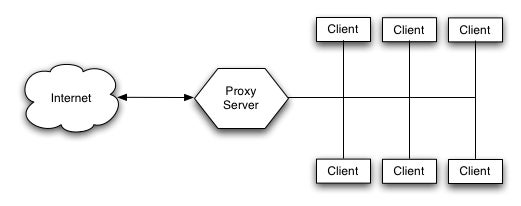
Using a proxy server like this relies on special configuration within the client browser to tell it to communicate its requests for a Web page directly to the proxy server, rather than directly with the host. For example, within Internet Explorer the proxy settings are available through the Connections tab of the Internet Options, as shown in Figure 2.
Figure 2Internet Options Connections Tab
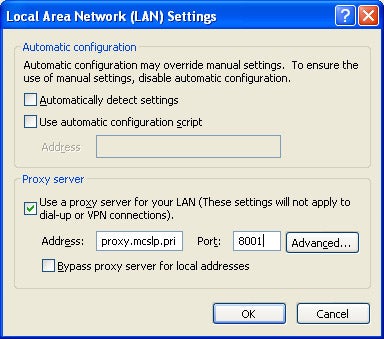
Apache can act as a proxy for either FTP or HTTP services, and it’s possible to add other proxy types using extensions. Whatever protocol is used, the result of using the proxy service is that communication requires extra steps. For example, interaction between Client and ServerWatch.com instead of being:
- Client sends request to ServerWatch.com
- ServerWatch.com replies to Client
Becomes:
- Client sends request for ServerWatch.com to Proxy
- Proxy sends request to ServerWatch.com
- ServerWatch.com replies to Proxy
- Proxy sends reply to Client
Proxy configuration relies on setting a host address and port to listen to, enabling the proxy server and setting some optional settings to secure the server and configure the caching and blocking of the proxy service.
Original date of publication, 10/15/2003