


I have
written a couple of articles that explain how to set your Page file and how exactly you are
benefiting by doing so. I just noticed that the XP style is a
bit different for changing these settings, so I figured I’d walk you through
making a Page file change (usually an increase) in Windows XP.
I have written a couple of articles that explain how to set your Page file and how exactly you are benefiting by doing so. I just noticed that the XP style is a bit different for changing these settings, so I figured I’d walk you through making a Page file change (usually an increase) in Windows XP.
First, go to the “My Computer” icon on your Desktop. Right
click and drop to “Properties”. You will get the following box:
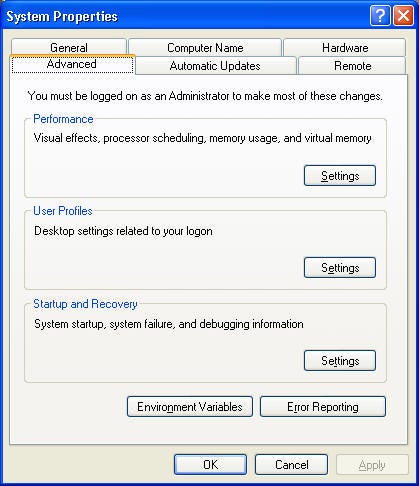
I have taken the liberty of already selecting the “Advanced” tab
in the window.
Next, you click the button for the “Performance” section:
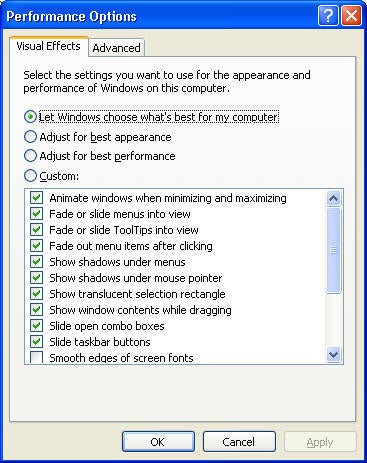
Here you can make some basic changes, but to affect the Page
File, click the “Advanced” tab (again) and you will get the following:
The next pop up does not allow you to change this setting (yet)
but does allow you to make some more configuration changes:
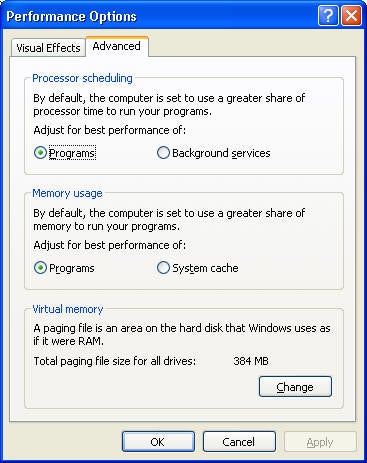
Now, if you select “Change” in the Virtual memory section, you
will get the following pop-up (where you will be able to actually change the
size of your paging file).
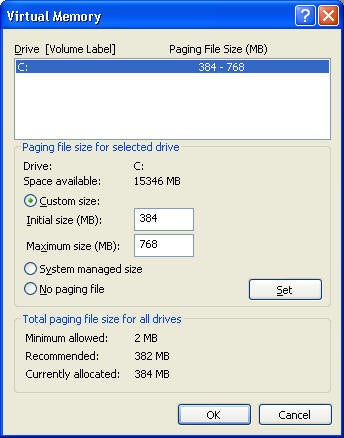
My advice (as is that of MSFT) is for 1.5 times real memory.
Let me know if you have any questions.