


Remote Assistance via the Windows Messenger
There are
many different ways to solicit help via Remote Assistance. I
will outline the main ways to ask via the local system.
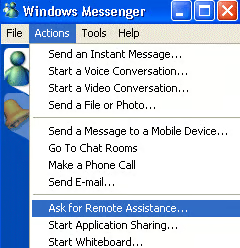
You can ask
for Remote Assistance via the Windows Messenger by logging
in to the Windows Messenger and going to Actions on
the Menu bar and selecting Ask for Remote Assistance.
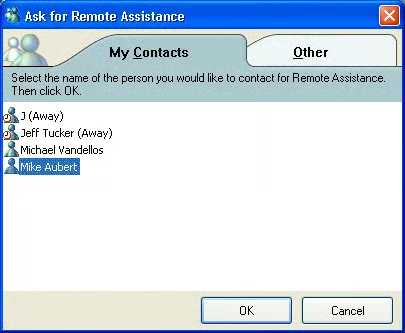
This allows
you to select a person from your list of contacts, provided
they are online at the time.
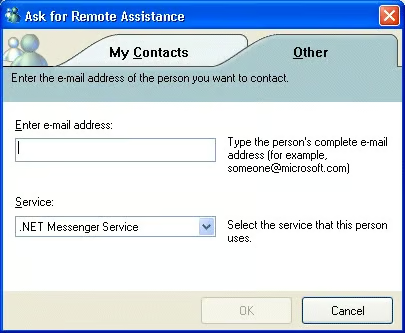
You can
also select the Other tab to enter the e-mail address of
another person to contact.
The invitation from the My Contacts list will show up in the
conversation window.
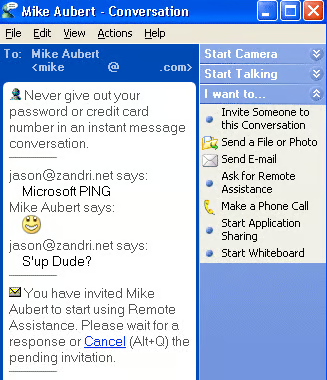
Also, if you already have a conversation session established
with the person you want to request help from, you can simply
select the Ask for Remote Assistance button from the
I want to….menu.
Once the person accepts the invitation, you will see a
dialog box asking you to confirm permission. In order for
the session to continue, you would need to click Yes.
They can
then operate on your system at whatever level of control
that has been allowed (Either view or full control).
[NOTES
FROM THE FIELD] – The client requesting the remote
session maintains ultimate control of the session even
thought they have granted temporary controlling access to
the invitee. Although you relinquish control of your
computer temporarily, you retain control over the Remote
Assistance session itself. The client requesting the remote
session can end the session immediately by clicking the Stop
Control button or pressing the ESC key.
Page 4: Remote Assistance via the Help and Support Center