

As
system administrators and such, occasionally
we require specific information about a customer’s computer when we are
troubleshooting their configuration. Windows
2000 Professional and Server can create a comprehensive listing of their
hardware, system components, and software environment which may be useful in
helping resolve system problems.
As system administrators and such, occasionally we require specific information about a customer’s computer when we are troubleshooting their configuration. Windows 2000 Professional and Server can create a comprehensive listing of their hardware, system components, and software environment which may be useful in helping resolve system problems.
From
the Administrative Tools folder, select Computer Management as shown below.
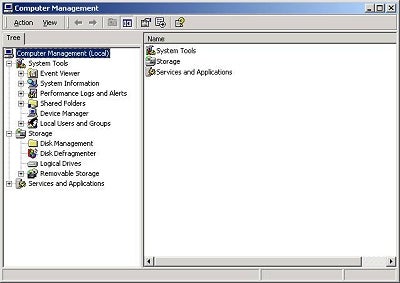
Right
click on System Information and select Save As Text File…
This
will generate a comprehensive text file listing of the hardware, system
components, and software environment.
Alternatively
you could Right click on System Information and select Save As System
Information File…
This
will generate the same information but in a formatted form readable on a Windows
2000 machine.
You
should be aware that it could easily take 5-10 minutes for the system to gather
the required information to create the information file, and you will see the
hourglass while this is occurring. It’s
not a system lockup, it’s just gathering information.
Thanks
to Steve Margolies for showing this to me….