


Software Installation and Maintenance
GPOs can be
configured from the General tab of the Software Installation
Properties dialog box, with specific settings that affect
the installation, maintenance and any subsequent removal of
Group Policy deployed applications.
To do this
the Administrator would open
the Group Policy snap-in and open the Software Settings in
Computer or User Configuration section. (This would depend
on whether it was a Computer or User deployment.)
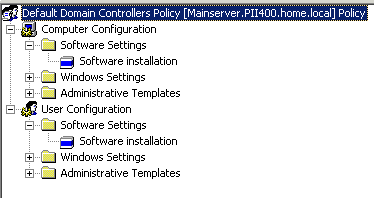
Then, you
would right-click the Software Installation node and select
Properties, which would bring you to the Software
Installation Properties dialog box, shown below.
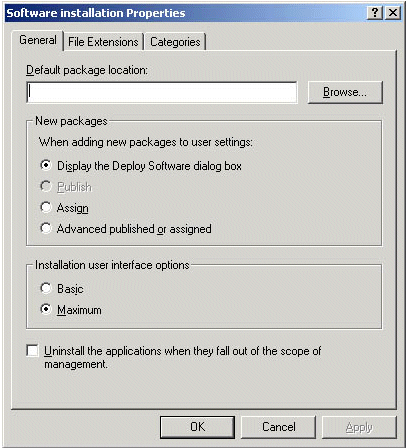
In the
General tab of the Software Installation Properties dialog
box, you would enter the path to the Software Distribution
Point for any necessary MSI files in the Default Package
Location box. If you don’t know the full path, you can use
the Browse button.
Directly
below the Default Package Location field is the New Packages
section of the Software installation Properties. Here you
will need to select one of the following options:
- Display The Deploy Software Dialog Box to
specify that when you add a new package, the Deploy
Software dialog box will display, allowing you to assign,
publish, or configure package properties. - Publish is used to specify that when a new
package is added it is to be published with standard
package properties. Packages can only be published to
users, not computers, and this is why under the Computer
Configuration node of the Group Policy snap-in the Publish
option is grayed out. - Assign is used to specify that when you add a
new package it is to be assigned with standard package
properties. Packages can be assigned to both users and
computers. - Advanced Published Or Assigned is used to
specify that when you add a new package, the Configure
Package Properties form should appear.
In the
Installation User Interface Options section you will need to
select one of the following:
- Basic to provide only a basic display of the
install process. - Maximum to provide all installation messages
and screens during the package installation.
Check the
“Uninstall The Applications When They Fall Out Of The Scope
Of Management” check box to specify that the software should
be removed when the GPO no longer applies to users or
computers.
Click OK to
close out the properties sheet.
Well, that wraps up this section
of Learn Active Directory Design and Administration in 15
Minutes a Week covering Windows 2000 Server Software
Management Tools for handling the deployment and management
of software through Group Policy. I hope
you found it informative and will return for the next
installment. Next week is going to
focus on Deploying Software and Software Maintenance.
If you have any questions, comments or
even constructive criticism, please feel free to drop me a
note.
I want to write good, solid technical
articles that appeal to a large range of readers and skill
levels and I can only be sure of that through your feedback.
Until then, best of luck in your
studies and remember,
“I still
have yet to figure out what happened to Preparations A
through G.”
Jason Zandri
Jason@Zandri.net
www.2000trainers.com