


Transferring FSMO Domain Controller Roles
Once additional domain controllers have
been installed in the forest,it is recommended to move some
of the load off of the forest root domain controller (the
original domain controller installed in the forest and
domain which holds all the per-forest and per-domain roles).
Operations Masters role transfers take place in
conjunction with the current (active) Operation Master. That
is, when you move the Schema Master from the default Domain
Controller to another Domain Controller in the forest, that
is considered a transfer. When you use this controlled
transfer process, the original Operations Master server and
the new one can properly synchronize their directory
databases to ensure that the directory is up to date when
the “final” hand-off is made.
The Schema Master
domain controller and the Domain Naming Master operation
master roles should be placed on the same domain controller
for best practices where security and maintenance are
concerned.
[NOTES FROM THE FIELD] –
If and when you should decide to start
updating the domain controller role owners of the different Operations
Masters, you need to be aware that the Schema Administrators
are the default user accounts that have the rights to change
the Schema Master role owner, the Enterprise Administrators
are the default user accounts that have the rights to change
the Domain Naming Master role owner, and the Domain
Administrators are the default user accounts that have the
right to change the domain wide Operation Master role
owners.
Default does not
mean that manually modified accounts CANNOT perform these
functions; it simply means that with their default standard
settings, these are the built-in accounts that have the
proper permission level to perform the desired transfer
function.
Below is a chart
of which FSMO roles can be handled using which MMC Snap-In.
| FSMO Role | Snap-in used for Administrator |
|---|---|
| Schema master | Active Directory Schema |
| Domain naming master | Active Directory Domains and Trusts |
| Relative identifier master | Active Directory Users and Computers |
| PDC emulator | Active Directory Users and Computers |
| Infrastructure master | Active Directory Users and Computers |
In order to transfer the FSMO server
role, it may be necessary to find out which Domain
Controller holds the
role if this isn’t well documented in your environment.
In order to determine which Domain
Controller holds the role of the Schema Master in the case
where you are not sure, you would need to use the Active
Directory Schema snap-in.
[NOTES FROM THE FIELD] –
Because editing the Schema directly is highly unadvisable,
this tool is disabled by default. You need to register the
DLL for the MMC snap-in before you can use it.
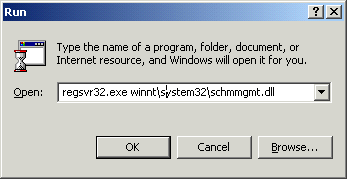
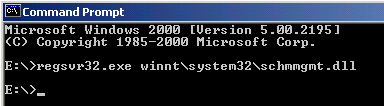
In order to use the Active Directory
Schema MMC you need to register the schmmgmt.dll file. This is
done by going to either a command prompt or to the RUN line of
the start menu and typing “regsvr32.exe
system32schmmgmt.dll”, where is
the installation path of the operating system on your
computer.
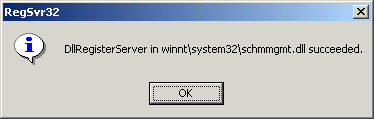
A message will appear that shows the registration of the DLL
succeeded, and you can click OK to close the dialog box.
The Active Directory Schema MMC will not automatically show
up in the Administration tools folder. You will need to
create a custom Microsoft Management Console and add
the Active Directory Schema snap-in to the console, and then save
it for future use.
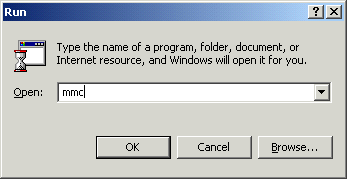
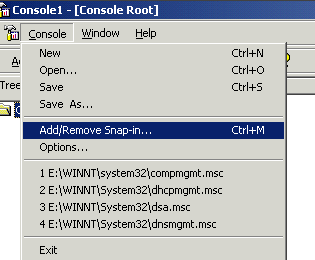
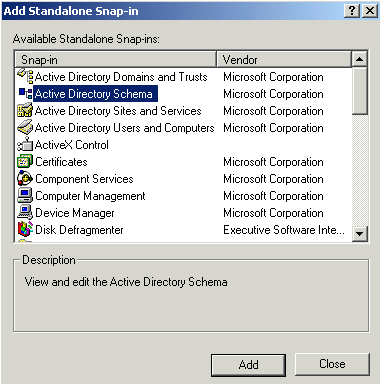
This is done by typing MMC at the RUN line
from the Start Menu, selecting CONSOLE from the menu bar and
continuing by selecting ADD/REMOVE SNAP IN, which opens the
Add Standalone Snap-In window, where you can choose the
Active Directory Schema snap-in.
[NOTES FROM THE FIELD] – If
you were to run MMC before you registered the schmmgmt.dll file,
the option to select the Active Directory Schema would not
be available under normal circumstances.
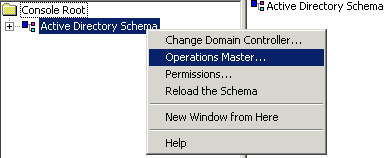
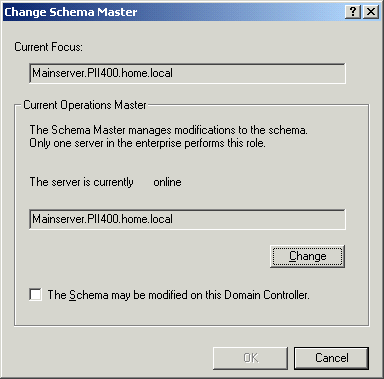
Once you’ve done this, you can fire it up and in the console
tree, right-click Active Directory Schema, and then select
“Operations Master” from the menu, which will show you the
name of the current schema master in the Change Schema
Master dialog box. (You do not have to change it if you are
only looking to see which server it is.)
[NOTES FROM THE FIELD] –
There are particular circumstances where role transfers
happen automatically. If you were to run DCPROMO on the
Schema Master to demote the Domain Controller to a member
server, the Operation Master Role of Schema Master would be
passed to whichever Domain Controller the current Schema
Master could reach.
To properly control the transfer of
Operation Master Roles to the other Domain Controllers, you
should transfer the Operation Master Roles before performing
Domain Controller demotions.